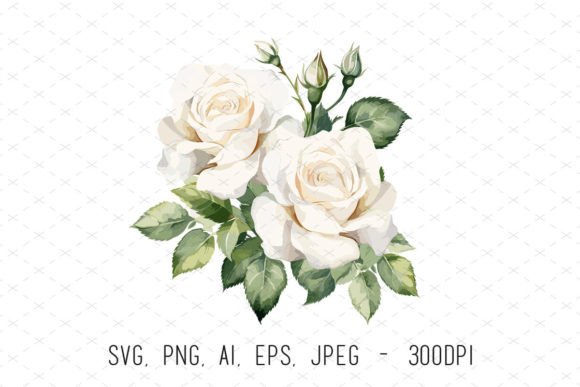
White Wedding Roses Sublimation Clipart: A Designer's Guide to Elegant Floral Assets
There's something timeless about white roses. They carry a sense of purity, elegance, and sophistication that works across countless design contexts—from wedding invitations to luxury branding. When you combine that classic beauty with the versatility of digital clipart, you get a design asset that can genuinely transform your creative projects. White Wedding Roses Sublimation Clipart offers exactly that: beautifully rendered watercolor rose illustrations in multiple file formats, ready to drop into virtually any project you're working on.
What makes this particular set stand out is the attention to quality. At 300 DPI and 4500x4500 pixels, these aren't your average clipart files that fall apart the moment you scale them up. Whether you're printing on a small greeting card or stretching the design across a large wall art piece, the resolution holds up. The transparent backgrounds mean you can layer these roses over any color, texture, or pattern without awkward white boxes or editing headaches.
Why Watercolor Florals Work So Well in Modern Design
Watercolor illustrations occupy a sweet spot in contemporary design. They feel handcrafted and organic without looking amateurish. For small business owners building a brand identity, watercolor elements like these white roses communicate warmth, authenticity, and attention to detail. They're particularly effective for businesses in the wedding industry, beauty and skincare brands, boutique bakeries, floral shops, and lifestyle blogs—but honestly, their appeal extends far beyond those niches.
The soft, painterly quality of watercolor roses pairs beautifully with modern typography. Imagine these delicate floral elements framing a bold sans serif heading on a wedding invitation. Or picture them as subtle accents on a product label, adding just enough visual interest without overwhelming the text. The versatility here is genuinely impressive, and it comes down to the artistic style being both detailed and restrained at the same time.
Practical Applications Across Your Creative Projects
The included file formats—PNG, SVG, AI, EPS, and JPEG—cover pretty much every design software and workflow out there. Working in Adobe Illustrator? Use the AI or EPS files for full editability. Designing in Canva or Procreate? The PNG files with transparent backgrounds drop right in. Need to scale infinitely for large-format printing? SVG has you covered. This kind of format variety is what separates a premium design asset from the cheap clipart bundles you find scattered across the internet.
Here's where these files really shine in practice:
- Invitations and stationery: Wedding invitations, save-the-dates, bridal shower cards, and thank-you notes benefit enormously from elegant floral accents. These roses frame text beautifully and add that romantic, celebratory feel clients expect.
- Merchandise and physical products: Sublimation printing is in the name for a reason. These designs are optimized for transfer onto mugs, t-shirts, tote bags, and pillows. The high resolution ensures crisp, vibrant prints even on textured surfaces.
- Digital marketing assets: Social media graphics, email headers, and website banners all benefit from eye-catching floral elements. A single rose accent can transform a plain promotional image into something that stops the scroll.
- Packaging design: If you're creating product packaging for candles, soaps, chocolates, or similar gift items, watercolor roses add a premium, artisan quality that customers notice and appreciate.
- Print materials: Business cards, brochures, posters, and flyers gain sophistication when paired with carefully placed floral illustrations. They work especially well as corner accents or background elements at reduced opacity.
- Digital products and templates: If you sell printable planners, journal pages, or digital templates on platforms like Etsy, incorporating these roses can elevate your product offering and justify higher price points.
Building Visual Consistency Across Your Brand
One of the most overlooked aspects of brand building is maintaining a consistent visual language across every touchpoint. When a customer sees your Instagram post, visits your website, receives your product packaging, and opens your email newsletter, those experiences should feel connected. Using the same floral clipart elements across all these channels creates that visual thread that ties everything together.
Think about it this way: a wedding photographer who uses these white roses on their business cards, website header, client welcome packet, and social media templates immediately looks more established and intentional than someone using mismatched stock photos. The roses become part of the brand's visual signature—a recognizable element that clients associate with quality and professionalism.
This approach works for content creators too. Bloggers who consistently use the same style of floral graphics across their posts, Pinterest pins, and newsletter designs build a stronger visual identity. Readers start recognizing the content before they even read the headline. That kind of brand recognition is invaluable and surprisingly achievable with the right design assets.
Font Pairing and Typography Considerations
When working with ornate floral clipart, your typography choices matter more than you might think. The goal is balance—your text needs to complement the illustration without competing with it. For wedding-related projects, elegant serif fonts and flowing script typefaces pair naturally with watercolor roses. Think classic combinations like a refined serif for headings paired with a clean sans serif for body text, with floral accents providing the decorative layer that would otherwise require a more ornate typeface.
For more contemporary applications—like a modern lifestyle brand or a minimalist product label—pairing these roses with a geometric sans serif creates an interesting contrast. The organic, hand-painted quality of the flowers softens the precision of the typography, resulting in a design that feels both polished and approachable. This kind of intentional font pairing is what separates thoughtful design work from projects that feel thrown together.
A practical tip: test your font choices at the actual size they'll be viewed. A script font that looks gorgeous at 72 points on your screen might become completely illegible at 12 points on a business card. When you're layering text over or alongside detailed floral clipart, readability becomes even more critical. Make sure there's enough contrast between your text and the background, and don't be afraid to add a subtle overlay or shadow to ensure your message comes through clearly.
Working With Multiple File Formats Efficiently
Having five different file formats might seem like overkill, but each one serves a specific purpose in a professional workflow. The PNG files are your go-to for quick projects—they're ready to use with transparent backgrounds in any design application. SVG files are essential for web design because they scale perfectly at any screen resolution without increasing file size. The AI and EPS vector files give you full editing capability in professional design software, allowing you to modify colors, resize elements, or extract individual components from the composition.
The JPEG files work well for mockups and presentations where you want to show clients how the design might look in context. Since they don't have transparent backgrounds, they're best suited for situations where the white background actually works with your layout—like placing the roses on a light-colored surface or using them in a mood board.
For anyone running a small business or managing multiple client projects, having this range of formats means you spend less time converting files and more time on actual creative work. It's a small detail that makes a significant difference in workflow efficiency, especially when you're juggling deadlines.
Commercial Use and Licensing Awareness
Before incorporating any design asset into commercial projects, always verify the licensing terms. Understanding whether you can use the clipart on products you sell, in client work, or in digital downloads protects both you and your business. Most premium clipart sets like this one are designed with commercial use in mind, but the specifics can vary—some licenses limit the number of end products, while others allow unlimited use.
Keep records of your design asset purchases and their associated licenses. If you're creating products for print-on-demand platforms, selling templates, or designing merchandise, this documentation becomes important as your business grows. It's the kind of administrative task that feels tedious in the moment but saves significant headaches down the road.
White Wedding Roses Sublimation Clipart represents the kind of design investment that pays for itself quickly. The combination of artistic quality, practical file formats, and broad creative applicability makes it useful whether you're a professional designer managing client projects, an entrepreneur building a product line, or a hobbyist who simply loves creating beautiful things. The real value isn't just in the files themselves—it's in the creative possibilities they unlock across every project you touch.